





Mobile usability testing presents its own unique challenges to data collection and observation. The screen size and design of the mobile hardware impacts how your participants are going to be viewing and interacting with your design. These challenges impact how recording devices and software are set-up for the usability sessions. In some set-ups, participants are given instructions to lay the mobile device flat on the table, or the device is placed in an unnatural stand for them to interact with. Although these provide a stable and reliable manner to record what the participant is selecting on the screen, they do not provide accurate or reliable data on hand gestures, postures or tap errors. The artificiality of the set-up also impacts participant satisfaction and perception of ease-of-use.
Continue reading "Gestures, postures, and tap errors: an observation must for mobile usability testing"
Foley Lynn
Gestures, postures, and tap errors: an observation must for mobile usability testing
News
Visualizing requirements vs. scope
During the course of a strategy engagement a few years ago, Gord and I drew a diagram on the whiteboard that illustrates how business and user requirements intersect to form the scope (and possibly the roadmap) for a project. The diagram proved useful in explaining where requirements went after being gathered and also the opportunities available to clients once armed with the requirements that their users and customers desired from their user experience.
This diagram has since been used countless times in everything from proposals to client presentations. It has also appeared on our website since November 2010 without explanation. Internally we call it the “Football diagram” as it is much shorter phrase than “Business and User Requirements vs. Scope Diagram” and its shape resembles the uprights used in American football.
Continue reading "Visualizing requirements vs. scope"
News
Dr. Pepper / EA integration wins Horizon Award
The Dr. Pepper Every Cap Wins promotion has won a 2010 Horizon Interactive Award Bronze in the Integrated Marketing category.

The promotion allowed consumers to take coupon codes from Dr Pepper bottles and fountain drinks and redeem them for digital goods – add ons for their players inside EA games. 500 million coupon codes were issued at Dr Pepper retail outlets throughout the USA and launch titles included Spore, SIMS 3, Mass Effect 2 and Battlefield Heroes.
Continue reading "Dr. Pepper / EA integration wins Horizon Award"
News
UX wish list for 2010
With the new year upon us, instead of looking backwards to where we were with usability and user experience design, I prefer to look into the future. Upon reflection of past 10 years in which I have been working in the field, user experience has progressed in leaps and bounds. The list below is short and sweet as it identifies what I hope will continue to progress over the next year with usability and interaction design.
News
How Lenovo turned a battery recall into a great user experience
| Disclosure: Neither OpenRoad nor myself has any affiliation with Lenovo nor their battery recall program (other than owning a few of their laptops). Lenovo is was unaware of this blog post and has made no contribution to its contents. |
A recall is surely one of the most difficult and potentially costly situations that a company can find itself in. There is almost no good that can come out of such a predicament from a brand, customer service, or customer experience perspective. Many of the following will apply:
- The damage of admitting that there is a problem with your product and associated bad press
- The coordination and costs involved in getting the word out to the customer
- Creating a temporary recall program that must be built from scratch and results in nothing but cost
- Costs associated with reissuing and shipping the problem part
- Inconvenience to the customer while he/she waits for repair and or shipping
- Risk that it will be a deal breaker the next time the customer needs to make a purchase in your category
- If your recall is safety or food related (need I drag up the Maple Leaf tainted meat recall?), the liability associated with damage done by your product
So with a recall being so unpleasant for all involved, what is the best you can hope for? A recent battery recall for my Lenovo laptop produced a two-fold outcome:
- The cheapest possible, low-touch, efficient process, and
- The happiest possible customer
At these two things, for me at least, Lenovo did extraordinarily well.
The trouble started when I closed my laptop the last day of work in December, putting it into standby mode. Standby reduces battery usage to a trickle but still consumes power nonetheless. I then forgot about my laptop over the holiday and didn’t touch it until the night before I was to return to work in January.
I noticed that the battery light on the laptop was flashing red and plugged it in thinking it just needed a charge. The next morning it was still flashing. It again failed to charge up while in my docking station at the office the next day.
The power manager tool stated that the battery was in “poor condition” and showed that the battery still didn’t contain a drop of electricity despite charging for two full days. I was hesitant to try the battery reset feature, since the warning dialogue said it could take several hours to perform. I had work to do and put off dealing with the battery by working off the adaptor for the rest of the week. I eventually traded batteries with a colleague and saw the same symptoms on his laptop. I finally tried the reset function which didn’t do anything at all. The battery was clearly toast.
The question was now, “is this battery covered by warranty?” Unlikely, but worth a shot. My first instinct was to find a phone number to call Lenovo Support. As the dreadful thought of being on hold for half an hour consumed me, I thought I’d see what Google produced on the matter. Here’s what I found:

The answer to my question: “Is my battery covered by warranty?” was definitely within the first five links in Google:
- Link one suggested some kind of replacement program
- Link three suggested some kind of standard warranty terms
- Link five indicated that others in my situation had their quest end in frustration
I started with that first link: “ThinkPad battery will not charge…”
It is tough to say whether my excellent user experience began as a result of some competent search engine optimization by Lenovo, if they were just well linked, or I was plain lucky. I’m not sure it matters. All I know is that things were handled very well from this point on.
Here are five things that Lenovo did well to execute the battery recall with low touch and high impact:
1. They generated an excellent scent trail to pull me into the content
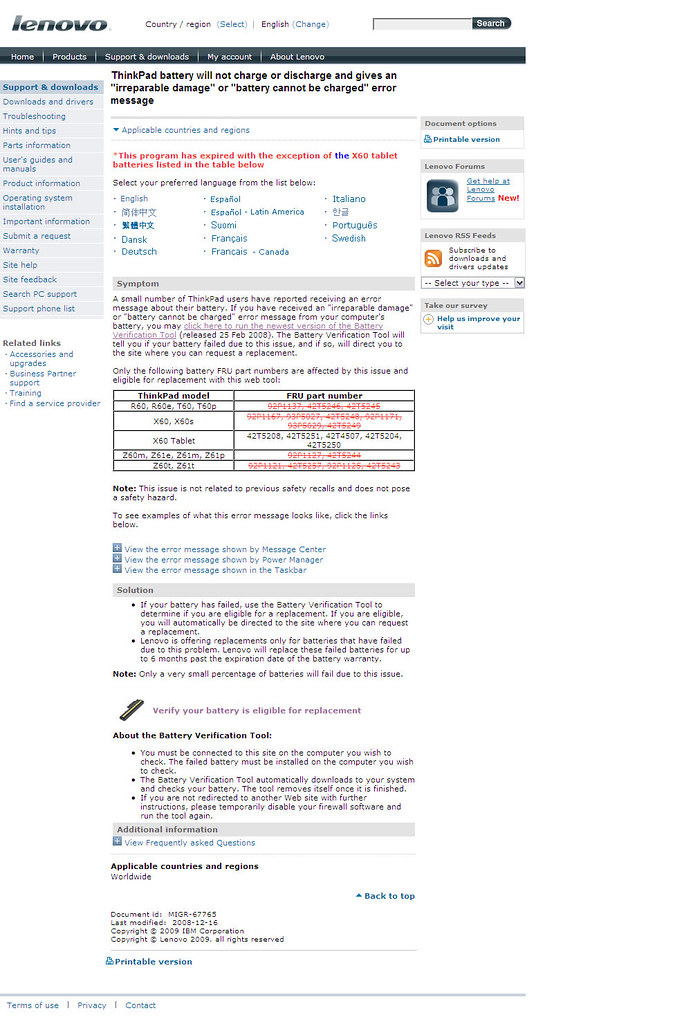
The landing page was an excellent example of UIE’s Jared Spool’s principle of designing for the “scent of information”. Spool states that web pages succeed when they provide the user an increasing sense of confidence that they are getting closer to their goal. By ensuring that the “trigger” words the user seeks appear on the page, the user feels increased confidence that she is getting closer to their goal -- not unlike following a scent to its source.
The Lenovo support page reeked of scent:
- The title quotes some of the error messages that affected batteries produce
- The exact laptop models affected are clearly listed
- The exact part numbers are listed for those that may have Googled their battery number
- Screen captures show the user exactly what the error messages look like on the laptop


Each of these factors builds confidence that the next step, using the downloadable verification tool, is worth the user’s time (or not) and will give a definitive answer on whether they are in for a free battery or about to be $150 out of pocket.
2. They managed their content throughout the entire recall lifecycle
Lenovo clearly understands that content has a lifecycle: a beginning, middle, and end. On many websites, once content is published, it is quickly forgotten regardless of its accuracy or relevance. Lenovo clearly takes responsibility for its content and feels its duty to keep its content up-to-date.
- Note the red text at the top. The program is over, unless you’ve got an X-60 model. (Fortunately, that was me)

- Again in the table further down the page, all model numbers have been updated with red strike-throughs except the X-60 numbers
3. They made confirmation of eligibility dead simple and avoided a horrific phone call
Probably the highlight of the user experience was their little verification tool. The site prompts you to download and run a little application which I assume does whatever deep exploration of the battery’s chip needs to happen to determine if it is one of the recalled ones.


Lenovo even took the time to give the application a logical name and icon, increasing user confidence that she has the right application on download, but also later, when it comes time to delete from the desktop. It takes a few seconds to give an application file a sensible name, but even the best vendors don’t take the time to make it descriptive and informative.
The application doesn’t require installation, it runs directly from the desktop and determines in a few seconds whether the battery is eligible for replacement and redirects the user to a web page to provide details.
Imagine what the support call to determine this information would be like over the phone. Imagine talking even someone tech savvy through a bunch of crazy DOS commands or asking them to read back the 15th digit of some 36 digit string or whatever the heck would be required without this little application. Even imagine the amount of time it would take for a customer to follow a great big long page of instructions to get this information. Imagine how error-prone the process would have otherwise been without the application.

The example above shows what ineligible users are shown. In my case, I was directed to a page with a form to fill in so that my replacement battery could be sent. It took a few moments to complete and I was done with the issue. What a great surprise after looking into the issue online on a lark.
4. Professionally managed the transaction
The replacement process was managed very professionally. They apologized for the inconvenience that the broken battery caused. You would expect a recall campaign to feel slapped together, but this one felt as if I had made an e-commerce transaction like any other.

5. Minimized my inconvenience
I submitted the form on a Thursday afternoon and I had the replacement battery the following Tuesday morning by courier. ‘Nuff said.
Needless to say I left this experience happy:
- I didn’t need to talk to anyone on the phone
- I didn’t need to put any effort into figuring out whether I was eligible
- I had my battery replaced within what amounted to two business days
I imagine Lenovo left the transaction happy as well:
- They had one less phone call to their support line
- They found the root cause of the problem and resolved it with minimal human intervention
Good for them and good for me.
However, I wouldn’t be a devotee of continuous improvement if I didn’t look for ways to improve further.
What more could they have done?
What more could they have done to really super please me?
This may seem extreme, but since Lenovo had my postal code from having to ship the new battery, it would be awesome if at the end of the process (or with the battery replacement battery) if they had suggested the nearest location to recycle the old battery.
How could they have helped themselves out better?
While it appears that Lenovo are using Omniture Site Catalyst for web analytics in their support pages, it does not appear that the battery verification tool result pages are tagged. No tags of course mean that it is more difficult to gather analytics data for these pages.
Lenovo may be able to use this information to determine:
- If anyone is failing to complete the submission form for the new battery
- If for example an unexpectedly large number of ineligible batteries were being submitted, perhaps there is a problem with the tool or a need to expand the recall
My suggestions aside, Lenovo took the time to carefully plan the battery recall. Good user experience does not happen by accident.
I don’t know Lenovo’s views on continuous improvement, but I do wonder if the execution on the recall was so well done as a response to the complaint in link #5 on Google. Regardless, I appreciated that they put in the effort to minimize the pain for both of us.
News
Are your website KPI’s traceable?
Here's a scenario:
You're sitting in a "Strategic Review" or "Deep Dive" meeting called by your Executive Vice President (or some equivalent higher-up). She wants to get to know your team better and find out what you accomplished in 2008, what your plans are for 2009, and what strengths, weaknesses, opportunities and threats you face with respect to your competitors in the year ahead. You've prepped all week reviewing all the Key Performance Indicators (KPIs) for your website to ensure they are top of mind if you are asked—"Know your numbers" you've been told.
Indeed, you are asked to share an indicator of success from the previous year. You proudly spout about how KPI X improved 25% over the year previous. Then, icy silence grips the room and you feel your stomach drop as she coldly retorts, "Who cares? What did you do to drive cost out of my organization in 2008?"
There is probably no greater insult than to be told that you are irrelevant. Essentially, you've just spent an entire year running the race in the wrong direction.
It is incredibly important to ensure that your Key Performance Indicators reflect the larger goals of the organization and your senior leaders. Otherwise, why do you have a website?
Relevance
At OpenRoad, whether assisting clients with new Key Performance Indicators or reviewing existing ones, they all must pass a relevancy test in terms of their fit with larger organizational objectives.
Relevance means that the goals of the website and thus the metrics used to gauge its success are consistent with or aligned to the larger goals of the organization. The website should be a force that drives the organization forward or contributes to the bottom line. Improvements to the site that lift the KPIs should by extension improve the organization's performance.
(It should be mentioned that relevance is only one test that your KPIs should pass. At the very least the KPIs and targets should be run through the "SMART" mnemonic. That is, all of your KPIs and targets should be Specific, Measurable, Attainable, and Time-bound in addition to being Relevant.)
Ensure relevance by illustrating traceability
Provided your employer is clear in its objectives, establishing relevance is as simple as drawing the connection between the larger objectives and your KPIs. In larger companies, the highest objectives sometimes link through divisional and departmental objectives along the way, but the connections should still be clear nonetheless.

At OpenRoad we use a simple table we call a KPI Traceability Matrix to show the connection from objective or goal through to KPI. A common example would have two to four columns, each representing a step in the hierarchy.
| Strategic Objective / Goal | Business Unit Goal | Key Performance Indicator |
| Increase Revenue by 10% | Increase sales of high margin products by 10% | Online high margin product sales rate (Number of online orders containing high margin products / Total number of orders for the period) |
| Decrease reliance on North American customers | 100K European leads by Dec 31st | European Newsletter subscriber rate (Number of new European Newsletter subscribers / Number of European visits) |
- The first column contains the highest level goals.
- The middle one or two columns contain the related divisional and/or departmental goals, each entry being associated with the related higher level goal on its left.
- The final column on the right will contain the KPIs, each correlated to the goal on its left and ultimately the top-level goal on its far left.
Reading the table left to right illustrates the traceability of your KPIs right up through the goals of your boss, all the way to the objectives that keep your senior leaders awake at night.
Like the pyramid above, often top level objectives fan out into many more objectives further down. You may need to repeat some of the high level goals in multiple rows of the KPI Traceability Matrix in order to correlate to all of the KPIs. This is fine—different KPIs may measure different benefits that drive the same overall objective. The point again is to ensure that the links can be clearly illustrated.
Identifying strategic objectives
If you are starting your KPI Traceability Matrix from scratch here are some places to look for those high-level or strategic goals:
In the organization's literature:
If you are employed at a large company, a well organized not-for-profit, or an organization that has been given a mandate from the government (such as a Crown Corporation), there is a good chance that the strategic objectives (sometimes and/or "strategic imperatives") are explicitly defined within an annual report, service plan or similar document. If not, they may be inferred by dissecting any available mission, vision or purpose statements that can be found into its constituent parts. If you are fortunate, explicitly stated objectives will come with explicit measures that you simply need to convert into an online KPI.
Trace your objectives up the hierarchy
Another method of finding strategic objectives is to start by examining the goals and targets given to you by your boss and seeing how they relate to the objectives set for him or her. Interview your boss and his or her leader to understand how they are measured and how they trace back to objectives set higher up the food chain.
Look for cues from the top
A third objective-hunting technique is to see how the senior leaders frame and position the organization in their communication. What objectives do they discuss in the media? With investors? On conference calls? In their monthly newsletters?
Achieving balance
You may find that your organization has strategic objectives where not all goals are weighted equally. You may also find that your organization takes pride in corporate responsibility and desires a "double" or even "triple bottom line" which factors the environment or the community into its definition of success. Where possible and sensible, it is wise to look at your KPIs holistically and strive for the same balance structured by the organizational goals.
One popular approach that many corporations use to set goals is the "Balanced Scorecard" approach espoused by Robert S. Kaplan and David P. Norton which recommends that companies balance their objectives by considering four factors:
- Satisfied Shareholders (Financial, bottom line type objectives)
- Delighted Customers (Customer satisfaction, loyalty, brand type measures)
- Effective Processes (Efficiency metrics, process metrics)
- Motivated and Prepared Workforce (Measuring employee morale, skill, buy-in)
If your organization follows this or a similar model, it may be prudent to have at least one KPI from each of the categories, e.g.
| Balanced Scorecard Objective | Example Key Performance Indicators |
| Satisfied Shareholder | * Average order size* Cost per page view |
| Delighted customers | * Percent satisfied (measured by survey)* Percent repeat purchasers |
| Effective processes | * Average time to publish* Percent stale content (> 90 days old without an edit) |
| Motivated and Prepared Workforce | * Percent employees satisfied (employee survey)* Percent employees certified (taken an internal course for example) |
You should also examine your organization’s goals for explicit or implied weighting of the objectives. Some companies will weight objectives with percentages to calculate overall performance:
- Goal 1: 50%
- Goal 2: 30%
- Goal 3: 15%
- Goal 4: 5%
Others will weight by having more KPIs related to some goals over others. OpenRoad has one not-for-profit client that weights its objectives by having more than one measure for two of its five goals:
- Goal 1: One KPI
- Goal 2: Two KPIs
- Goal 3: Two KPIs
- Goal 4: One KPI
- Goal 5: One KPI
They also further weight their goals by making some KPIs short term, to be measured in one year's time versus others to be measured three years out.
Regardless of the weighting scheme used, to have traceability and therefore relevance to the strategic goals, your KPIs should understand and reflect the priorities of the organization by reflecting their weighting when appropriate.
Get buy-in
Once you have created your KPI Traceability Matrix, vet it with your peers, your boss and through whatever Web Analytics stakeholder groups or committees that may exist within your organization. Buy-in on the traceability is just as important as acceptance on the KPIs themselves.
Make it a living document
In Web Analytics: An Hour A Day, Avinash Kaushik states that one should expect 15% of his or her KPIs to change in an average year as priorities are adjusted and the relevance of some KPIs wane. In this perhaps not so average year, 2009, your organization may choose to make strategic changes to cope with the economic crisis. It would be wise to stay on top of such changes in your organization and ensure that your KPIs remain traceable and relevant.
Circle the dates on your calendar when the annual report or service plan comes out and set aside time to double check the traceability of your KPIs. Stay up to date with announcements, appointments and reorganizations -- new people in charge may mean new priorities or objectives that may break your KPI Traceability Matrix.
Keep it handy
Keep your traceability matrix a copy/paste away in whatever format is the local currency at your organization, be it PowerPoint, PDF, MS Word, E-mail, or a JPEG so that it can be dropped into a presentation or report when required.
By taking the time to understand and document the traceability of your KPIs, you will ensure the continued relevance of your website, web analytics, and yourself within your organization.
News
Content Migration: The iceberg of CMS projects
It lies there just over the horizon and just below the surface of any Content Management System (CMS) implementation. It is the factor that is most often forgotten or ignored as the CMS build barrels toward launch. It is often left out of the project plan altogether but can take longer than the build itself. It is content migration.
It's easy to understand why migrating content from your old website system to a new CMS is overlooked:
Content migration is underestimated and misunderstood.
Many organizations moving to a CMS have never been through a migration before and get blindsided by the amount of coordination and planning required to get through it
Content migration is hidden.
When some consultants are bidding on work, they don't want to raise the issue because it may balloon the timeline or costs vs. their competitors
Content migration is ugly.
Put simply, it is not attractive. Who wants to think about copying and pasting content or writing migration scripts when you can spend your time admiring your site's new visual design or playing with the new features of a recently installed CMS software package?
For all the reasons to ignore the inevitable, the truth remains that failure to adequately strategize, plan, schedule, and budget for content migration can easily sink your CMS project. Failure to plan can lead to delays as the content migration drags past the launch date. Conflicts can occur as extra resources are called upon at the last minute to attempt to migrate mountains of web pages into the new system. After all of the hard work your team has put into designing and building the new system, content migration is the last hurdle—one that you don't want to underestimate.
Here are some guidelines that OpenRoad uses to work with our clients to help ensure a smooth migration and an on-time launch.
Include content migration in the project plan. Time is required to consider and draft a migration strategy and approach document and to modify it as the project progresses and decisions are made. Time is required for the migration itself. Because the project plan is written early in the process, it is necessary to be very conservative and even pessimistic in the amount of time required.
Determine if the migration approach is to be Automated vs. Manual vs. Hybrid. Depending on the systems involved, it may be possible to automate the movement of content between systems. If the original system is a CMS or the original content is very structured and the content organization is to change little in the new site, then it may be possible to write a script that reformats the original content and populates the new content repository. Most scenarios however, involve a manual copy/paste job into the new system. Scenarios where a single site has content physically residing in multiple environments may utilize a hybrid manual/automated approach for different sections of the site.
Resourcing for migration should be addressed early in the project. The best case scenario has resources dedicated to the task until it is completed. To achieve this resources need to be booked in advance so that their regular duties can be cleared or reassigned for the period.
I have heard of some organizations outsourcing the content migration activity. I don't recommend this because it distances the organization from taking ownership of its content and denies the opportunity for the content contributors to learn the new CMS inside and out prior to launch.
Reduce the scope of migration through ruthless pruning of the content inventory. The simplest way to reduce the time required for content migration is to leave any outdated or unimportant content behind in the old system. Organizations should only migrate relevant content to the new CMS.
Think about before, during, and after. The Content Migration Approach document should address content transformations that need to take place before migration begins, during migration, and once the content is in the new system.
Pre-migration: Reduce the inventory, determine URLs to grandfather, do a final update of the content before migration. If automated scripts are to be used, these should be tested and put through a dry run before the real thing.
During migration: What needs to be done to get the content into the new system? Regardless, this should be done during a content freeze - more on this below.
Post migration: What type of clean-up needs to be done once it is migrated? Often hyperlinks fall into this category as frequently the final URL (or link variables that render a final URL at run time) are not known until all content is in the new system.
Negotiate and communicate the nature of the content freeze before migration begins. Migration occurs best if the content on the "source" site is not being updated while content is being replicated in the new system. This entails a freeze or ban on updating the website for the migration period.
Every organization has different needs with respect to the ability to update their web site. Marketing-driven organizations will find any content freeze painful while a freeze at an institution or government department might pass by unnoticed. Any content freeze should be clear on the start and end dates that apply, any exempt content to which updates are permitted, how exempt content will be "caught up" in the new CMS, and who should be consulted if a mission critical issue comes up that warrants an emergency site update.
Foster a focused, goal oriented, teamwork based culture for the migration team. Assuming you have a dedicated team to copy/paste content, likely seconded from their regular duties, you need to keep the team focused and motivated. I suggest the following tools:
The War Room: Have dedicated facilities where the migration team can work together free from distractions.
Set goals and chart progress: A thermometer on the wall charts should be used to chart progress as the team ploughs through the content. Daily goals should be set for the team and each person so that migration is paced for the entire period.
Have an issue resolution process in place: The team should take advantage of each other to solve any problems that arise. If issues cannot be resolved in this way, tools should be in place to track minor bugs and a contact should be designated if a show stopper issue comes up.
Have little rewards and thank you prizes on hand: The migration team leader should give out little prizes to people who exceed their target, are really helpful at helping others solve problems or are great leaders. Keeping morale high will be important if a lengthy migration period is required.
Through careful planning and preparation and closely tracking progress during the migration itself, you can keep your CMS migration on track by navigating around the content migration iceberg.
Ready to migrate? Download our Content Migration Planning Guide for more tips on a successful migration.