What government can learn from interaction designers

I just returned from 2 great days of presentations and discussions at OpenGovWest in Seattle (March 26/27, 2010). Organized by Sarah Schacht of Knowledge as Power, the conference/unconference brought together leading thinkers and practitioners in the field of open government initiatives throughout the USA and Canada, primarily from our Cascadian cluster of BC, Washington, Oregon, and northern California.

The first day was a set schedule of presentations and small panels, the second day was an unconference format, where suggested topics were discussed by self-organizing groups of attendees. The 200+ people that attended represented a wide range of experiences, all trying to build a different kind of democracy through the use of modern network technologies.

Many of the sessions, particularly on the second day of unconference sessions, seemed to surround the question of “how?”

  • How do we engage citizens in our governmental/policy processes [using these tools]?
  • How do we design for a varied citizenry?
  • How do we deal with 10,000 comments on our public policy blog?
  • How do we assemble the right tools and technologies to build this new vision of government?
  • How do we measure success and report back the outcomes of our work?

Continue reading "What government can learn from interaction designers"

The architecture of Gov’t 2.0: OpenGovWest unconference notes

On Saturday March 28, 2010, I hosted a session at day 2 of the OpenGovWest conference that asked the participants what the architecture of gov’t 2.0 looked like, from a high level. I was interested in what other gov’t organizations around Washington, Oregon, California, as well as BC, had done in terms of building their websites and enabling open government and e-government in general. I had some good discussion amongst the group members and have captured my raw notes here on the blog as well as at the OpenGovWest wiki.

The Architecture of Govt 2.0


View more presentations from Gordon Ross.

Many thanks to those who came out to share their experiences for the session.

Continue reading "The architecture of Gov’t 2.0: OpenGovWest unconference notes"

Truckers online prove web 1.0 still a powerful force

With over 15,000 self-proclaimed social media experts on Twitter and all of the year-end buzz about Web 2.0 concepts in everyone’s 2009 top 10 list, it’s often easy to overlook some of the basic business value provided by that other Web, you know, the older more pedestrian Web: Web 1.0.

In 2006, OpenRoad was awarded a contract by the BC Ministry of Transportation to build a web-based system to help commercial vehicle carriers (ie: truckers) around the province of BC apply for their National Safety Code Certificate.

Keeping BC’s roads safe

The certification process is about keeping BC’s roads safe, ensuring that commercial truckers abide by a nationally agreed upon set of rules for their vehicles and drivers. In BC, there are over 26,000 commercial vehicle companies operating over 76,000 vehicles.

Obtaining an NSC certificate is mandatory for the truckers of BC. You have to have one. In years gone by, this process involved filling in a lot of forms, sending them via mail or fax to the BC government, then waiting to hear back on your status. Roughly 80 to 90% of the time, the submitted information was incomplete or incorrect and there would be extensive back and forth between the trucker and the government. Time would pass (typically just over a week) and eventually the certificate would be issued. Close to 3000 applications were received annually with that number growing each year.

Chronically incomplete information, ill-prepared commercial vehicle carriers, overloaded clerical staff chasing down faxed-in paper forms: the process was in need of improvement.

And so the CVSE tendered the work to build a web-based system to automate the application and approval of NSC certificates and OpenRoad was the successful proponent.

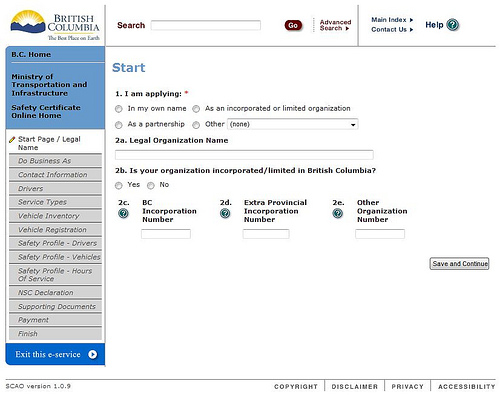
The application is simple. Truckers go through a multi-part online form that mimics the information collected previously via paper-based forms. They submit information about their company, their vehicles, their drivers, and their safety record. They attach supporting documents, if necessary, then they make their payment and exit the e-service.
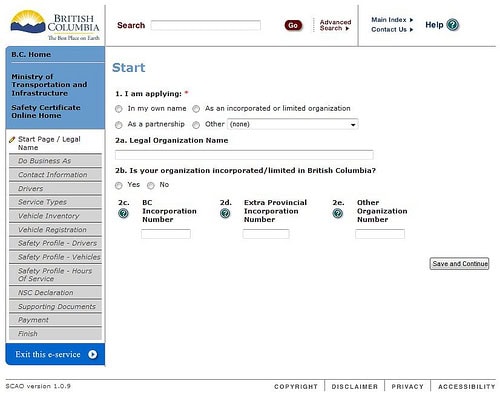
Government staff receives the application, review the information to ensure it is correct, and process the application, resulting in a confirmation email and issuance of a PDF certificate to the commercial vehicle carrier.

Validation rules within the web application ensure that information is complete and correct. When commercial vehicle carriers submit their information, the web applications uses web services to query the government mainframe to verify the information. The legacy systems at the core of the government’s operations are crucial to the overall application proceeding smoothly.

Ambitious goals

The business objectives of the team were aggressive: reach a 50% adoption of the online application form within one year of implementation. That’s right, move half of the applications from a paper-based system to an online system within in the first year. If you’re a business owner of a manual-paper based process and you’re contemplating moving it online, how comfortable would you be in targeting 50% adoption? Year two (2009) the team hoped for 70% adoption, year three (2010) 80%, and year four (2011) 90%.

The team was optimistic and dedicated to the success of the program. And they were right in reading the demand of their target customer, the commercial vehicle carriers.

But the results were well beyond anyone’s expectations.

The Safety Certificate Application Online (SCAO) launched in 2008 and within the first year of usage achieved an 80% adoption rate and it continues today to increase towards the 90% year four target. The average time to process an application dropped from 8 days to 1 day with the increased accuracy of information submitted. Overloaded clerical staff were re-assigned to other more pressing tasks within the Ministry and the cost savings have been significant.

Lessons learned

Automating paper-based processes using web based applications may seem like old news to many, but the point we believe SCAO has made is important: there’s still lots of value in Web 1.0, servicing the needs of inefficient business processes that consume far too much time and effort than is required.

And don’t underestimate the appetite for your customers to utilize the tools and technologies you create. Who knew commercial truckers would be so willing to adopt an online tool? Ease of use was an important factor in the application’s success, but the real driving force wasn’t usability but utility. It was clear that the process could be made better and SCAO provided that. The usefulness of the application was so compelling that everyone started using it immediately.

So while you’re looking at your web strategy, don’t get too distracted with social media and microblogging and all that wonderful 2.0 stuff—there’s still plenty of room left for innovation using 1.0 approaches, ones that drive real value, demonstrate real ROI, and improve customer and employee satisfaction.


Communicating your intranet requirements

Are you a company looking for a new intranet? Are you wondering if ThoughtFarmer meets your needs? Are you looking for a way to make your evaluation process a lot easier?

Image: The Consumer Decision Making Process (Kotler) as found in Peter Morville's book, Ambient Findability.

Buying software is not an easy job. There's a ton of software options out there. We've been on the other side of the table for many years, having done countless CMS evaluations for our professional services clients in building large public websites and intranets. We've relied on vendor evaluation lists and requirements checklists like those published by Tony Byrne at CMS Watch and James Robertson at StepTwo. You may have viewed the Gartner Magic Quadrant report, which we also appear in. You may have enlisted a professional services firm to help with the evaluation.

These tactics are all useful and help you march through the myriad of choices from Total Set to Awareness Set and onwards towards your final destination of Consideration and Choice. Of course, if only we could be quite as rational in our decision making as Kotler's lovely flow chart diagram. Most often, the decision process is still a bit of a black box.

One helpful tip that came across my inbox the other day was from a potential client who's in the process of evaluating ThoughtFarmer. They sent me a detailed spreadsheet with their requirements. Now this is not unusual and often forms the basis of the evaluation process. But what was unusual was the way they documented their requirements.

They took the typical software requirement of "the system shall do X" and wrapped it with some more context. It's a user-centred requirement, without needing to write some massively detailed use case.

Here's an example of a single requirement.

As a...I would like...So that...
Userto be able to post blogs about the things I am working onpeople can keep up to date with things I do, which may be relevant for them as well

What's so special about this way of documenting requirements?

They identified who this requirement was for. The User. They also included requirements from many other users, including the Intranet Manager, the IT Manager, and the Intranet Editor. I quickly got a sense of the different roles they had involved in their intranet.

They stated what they wanted. They wanted to be able to blog. Or more to the point, they wanted users to be able to publish their own information on what they were doing (which may be satisfied by the feature of a blog, but may also be satisfied in some other way). I understood their goals.

They told us why. Again, they gave us a bit more context around the request. We want a blog and here's why. The advantage for us as a vendor is that if we have a feature which may meet the need, but better than that, we now understand a bit more as to why it's being requested. If they think they want a blog, but explain why and we discern that perhaps they want a more wiki-like feature, we can now begin to engage in that dialogue with them about their needs and how we can meet it.

So for you intranet managers out there, evaluating software packages, this is a great place to start.

Ask yourself the following:

  • Who's the user?
  • What do they want?
  • Why?

You'll save yourself and the vendors you're talking to quite a bit of time and effort in clearly communicating your requirements. Remember, it's really about the needs and wants of your end users, not some shopping list of features.

* This blog post is re-posted from the ThoughtFarmer blog. Read more about social intranet software.

VanUE: World Usability Day 2009

World Usability Day happened on November 12, 2009 and a small squad of Vancouver user experience professionals got together at 8:00 a.m. at the Pine Street Community Garden to spend the day together, wondering how to best bring our professional expertise to bear on the issue of "sustainability"—the theme for WUD2009.

Photo of with sign saying Burrard Street Community Garden

Cat, Ben, and Barb from Habanero, Chris from Optimal Interfaces, Gagan from DesignStamp, Theresa from Key Pointe, freelancer Katja, and myself (Gord from OpenRoad) met up with Eric from the Pine Street Community Garden and started our 12 hour user experience "design slam" with in-person interviews and observational research. We then moved onto the Network Hub for the afternoon, who graciously provided the space for free, where we marched through the ideation process.

Drawing of note card saying "Sharon Plot: #116 member since: 2006 Expertise: Natural aphid removal Greatest Gardening Moment: 300 lb squash

Stickies were heavily used. Coffee was consumed. At at the end of the day we came up with a few design interventions that we thought might be able to help the garden.

Our presentation back to the Vancouver User Experience community happened on November 17 where we talked about the process, our findings, and encouraged other community members to participate in future design slams.

Vancouver User Experience Group: World Usability Day 2009 from Gordon Ross on Vimeo.

Thanks again to all participants, the Network Hub, and the Pine Street Community Garden for working with us.

OpenRoad welcomes Developer Rodney Gitzel

The team has grown a fair bit in the last few months here at OpenRoad and we're pleased to announce the arrival of another great developer: Rodney Gitzel. Rodney's web development expertise goes as far back as OpenRoad's 15 year history, as editor of Euphony Net-Magazine the first online arts magazine in Canada and publisher of Drop-D Magazine. He then joined IBM to work on Air Canada's online reservation system, and spent the next few years building a range of applications big and small for IBM clients. Rodney joins the OpenRoad team and will be sharing his knowledge of application architecture, Java, and systems with the team.

Welcome Mr. Gitzel!

What makes a successful web development project?

We were recently asked the question, "What makes a successful web development project?" by a potential client. It's a good question, one that I spent a fair bit of time pondering. Every project is different: the clients we work with come from varied industry sectors, have different organizational cultures, and different objectives. Over the past 14 years, we have learned a lot about what it takes to make a web development project successful.

Here’s some of those things:

Clearly defined strategy and business objectives

You can’t have a successful project if you don’t have a clearly defined goal that your team is working towards. Your organization has strategic goals. How will the website align to your strategy? How does the website fulfill your company's mandate? We want to know the big picture and ensure that big picture is agreed upon by all team members to reduce conflicting assumptions and make sure we’re all in agreement about the direction the site needs to go.

Leadership support

There are many stakeholders in a project, from the team members to the end-users of the final product, but some stand out as having a large impact, both positive and negative, on the project: the project sponsor or executive leader. We have engaged leaders to get their support on projects by keeping them informed and involving them directly in workshops or through steering committee structures.

Customer / end-user involvement

Design can be a lot of guess work, unless the end-user is involved. Instead of speculating on what might work and how a design might be received, we cut to the chase and find out. Talk to your customers. Test things. To quote our client IDEO, “Fail early and fail often”—get out in the real world and learn from your mistakes. There’s nothing quite as educational (or humbling) as watching a design you toiled over get poor marks in a usability session. Design isn’t about our designer egos; it’s about the customer and ensuring their success.

Solid project management

As rigorous and detailed as any project plan is at the start of a project, it cannot predict the future. Things happen: conditions change, requirements change, clients change, technologies change, customers change. Good project management becomes great project management when dealing with the unknowns and changes in a project. We’re lucky enough to have a great team of experienced and certified project management professionals at OpenRoad and have benefited from their decision making abilities, negotiation skills, and deep insight into the design and development process.

Honest discussions about scope and budget

Talking about scope, budget, and timelines on a project are difficult. Everyone wants the best possible quality item for the cheapest amount of money in the fastest amount of time! Coming to consensus on matters of scope, timelines, and budget are fundamental to project success. Rigorous estimating practices and solid project management inform and back up our ability to have these discussions with our clients, along with a willingness to work within the constraints and respect the limits of our clients’ time and money.

Explicit assignment of responsibility

We utilize a matrix document called a RACI to determine who’s responsible, accountable, consulted, and informed for tasks in our projects. Often times project conflict can occur due to the assumptions of team members as to who was responsible for a given task, or who should be consulted prior to a decision (and then wasn’t). By stating these assumptions up front and detailing them in a RACI matrix, we get to find the points of disagreement before the project starts. We also get to analyze the RACI to find out who has too much responsibility, isn’t being consulted enough, or needs to be informed more.

Respect for opinions and ideas

We enjoy working with our clients and their customers and respect the experience and subject matter expertise they bring to the project. We learn a lot from our clients and their end-users. After all, our expertise is the domain of building websites, web applications, and using the web strategically, not running a retail business or a library or providing car insurance or the production and distribution of electricity. This mixture of perspectives is one of the most enjoyable parts of our job and we feel privileged to engage in these conversations, ask “silly questions,” and challenge assumptions in a well-intentioned fashion.

There's so many more, but those struck me as pretty important. What others do you consider to have been important in making your web development project a success?